Every week we will bring you our tip of the week - a small chunk of information that might just make the difference to your Gallereo website. You may learn things that you didn't know about the system and find out new ways to manipulate the parts you do already know about.
This week, we look at how you can order the images in your galleries, something we all like to play around with every now and again. As they say, context is everything so you want to get your images looking good and sitting next to complimentary works in your portfolio.
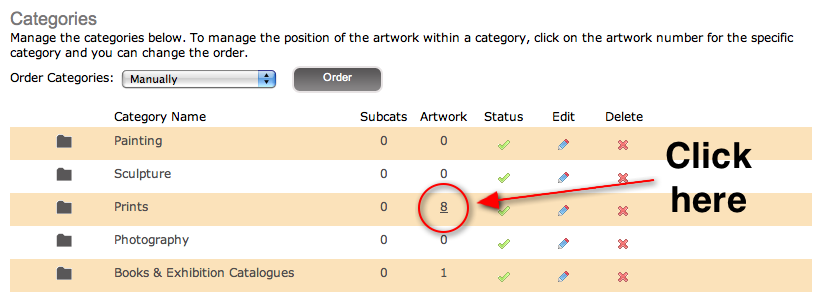
So here's how you do it; click on Categories in your Manage Art menu. You will then see a list of your categories as demonstrated below. Click on the number which tells you how many artworks you have in that category.
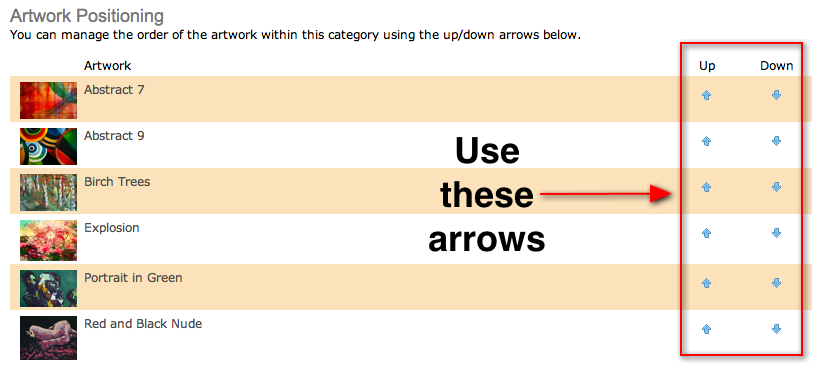
Once you have clicked on that number, you will be taken to a screen listing all of the artworks in that category. Below is just a snippet of that page to show you want it looks like. Use the up and down arrows on the right hand side to adjust the order in which your images appear in your gallery.
There's no need to press save, as soon as you start pressing the arrows to change the order, that change is reflected at the front end of your website when you refresh the page.
Check back next week for more top tips from Gallereo, and if you have any questions in the meantime, drop us a line at
support@gallereo.com.





 START NOW WITH OUR NO-OBLIGATION 30 DAY FREE TRIAL!