All the latest news from the art world, as well as what's happening here at Gallereo. If you've built a gallery at Gallereo, let us know about your experience and you and your site could feature in our blog in the coming weeks.
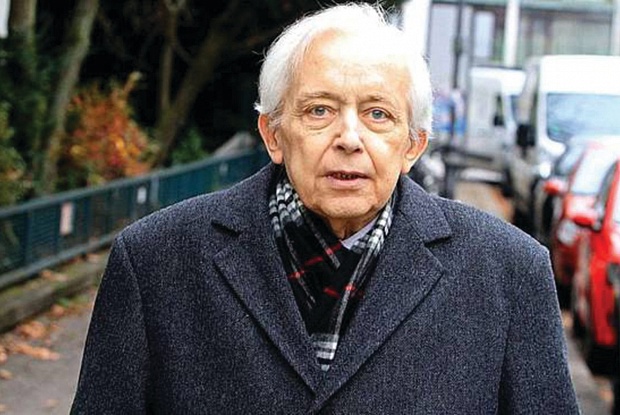
Faithful readers will no doubt remember the story of the treasure trove of artwork discovered recently in the attic of an elderly man in Munich and his second home in Salzburg. Cornelius Gurlitt had inherited the works from his art dealer father, a man who worked closely with the Nazis during World War Two during their destruction and confiscation of so-called 'degenerate art' (which essentially covered anything that wasn't classical Greco-Roman and Aryan, or that they just didn't like).
The provenance of the works was called into question repeatedly, and there were numerous issues concerning the methods by which he had attained them, until the story about his father was revealed. Since then, however, the legal drama has not ended.
Gurlitt eventually passed away in 2014 after undergoing heart surgery, but before he died he left everything in his possession to the Kunstmuseum in Bern, which included all the artworks in his possession. The collection was an impressive one too, featuring works by famous painters such as Otto Dix, Paul Cezanne and Claude Monet, among many others. Unfortunately for the Kunstmuseum, they rapidly received a legal challenge from Gurlitt's next of kin who would otherwise have received the ownership of the pieces.
Uta Werner maintained that Gurlitt was not of sound mind and therefore his will should have been thrown out and typical estate distribution would occur, leaving her the sole beneficiary. Finally, at long last, the Munich Higher Regional Court ruled against the legal challenge, saying that the fact that he wrote the will before his heart surgery indicated he was aware of the seriousness of the situation.
The Kunstmuseum is no doubt very pleased with the news, and the German Culture Minister Monika Grütters issued a statement lauding the fact that a proposed exhibition of the works can now move forwards.
"It is good that we all now have a clear understanding of the legacy of Cornelius Gurlitt. This decision helps us to continue the elucidation of the artifact quickly and transparently. In the end, the path is now free for the joint exhibition plans of the Kunstmuseum Bern and the Kunst- und Ausstellungshalle der Bundes in Bonn for the coming year."
"This step is essential for a responsible and transparent handling of the works and their history, but above all we are also responsible for this treatment for the victims all over the world," Grutters continued.
Photo by Markus Hannich
Posted on December 16th 2016 on 03:35pm
0 Comments
It's not unusual for art thefts to make front page news, no matter where they happen in the world. But there is one long-running hunt for missing art that you've probably never heard of, but perhaps you can be forgiven since it started way back in 1986.
Ferdinand E. Marcos, the dictator in power in the Philippines, had just been removed from power after two decades of brutal rule characterized by massive personal excesses and corruption. You've no doubt heard of his wife, Imelda Marcos, and her famously massive shoe collection. But you probably haven't heard that the pair were suspected of purchasing some fairly impressive paintings with embezzled government funds.
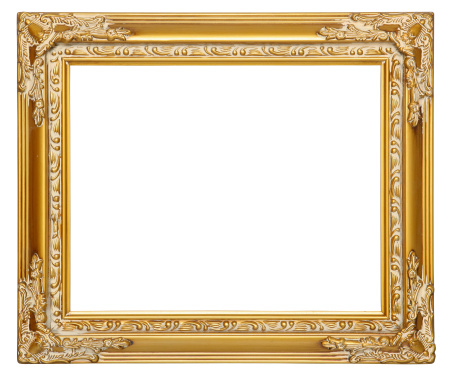
The paintings were by such famous masters as Pablo Picasso, Vincent van Gogh, and Edgar Degas, but they have yet to be found. Instead, when the volunteers investigated the Manhattan penthouse that the Marcoses' kept to throw lavish parties and entertain wealthy socialites, there were simply empty frames hanging on the walls with copper identification plates that described the pieces which used to hang there.
The decades-long search hasn't been without any success. In 1987, several important and valuable paintings were recovered by Raphael, Titian and El Greco, which sold for $15.4 million USD at a Christie's auction. In 1998, a missing Picasso was discovered after it was brought to Christie's for authentication, which eventually sold for just shy of $1 million USD.
The commission charged with finding these artworks has grown frustrated over the last few years, as so much time has passed that leads and trails have gone cold. However, they have not given up hope, and are turning to modern communication and crowdsourcing methods in an attempt to gain new leads on the still-missing pieces.
While they have achieved impressive results, the Filipino government has estimated that the full worth of the collection could be as much as $500 million US dollars, and the return of these pieces would not only be a fantastic public relations coup for the current administration but also a boon to the art world in general.
All too often the general public is neglected in consideration of stolen artworks, because once they have been stolen they obviously must be hidden away from the world. Hopefully, as the hunt for these missing treasures picks up steam again, the missing paintings will be restored to their rightful place where they can be appreciated again by the world at large.
Posted on December 14th 2016 on 03:20pm
0 Comments
So it looks like the world is going to have to come to terms with the presidency of Donald Trump, of all people. What once seemed like a joke (in fact, the TV show The Simpsons made just such a joke over a decade ago) has become the reality, and while that raises all kinds of postmodern questions about the nature of life imitating art, it's also a grim political reality.
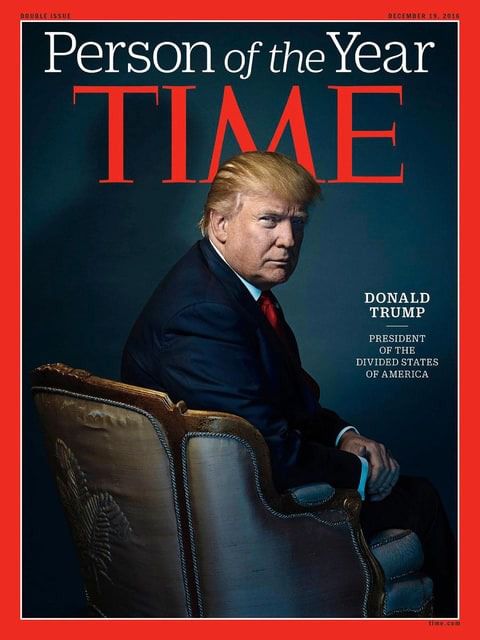
Thanks in large part to his presidency, Trump recently graced the front cover of Time magazine as the Person of the Year. Before this becomes too outrageous, remember that 'Person of the Year' doesn't come with the word 'best' attached, it merely reflects influence - for example, Hitler was also a Man of the Year with a Time magazine cover, as were Stalin and Ayatollah Khomeini.
However, this particular cover features a rather atypical photograph of the President-elect, and some have even gone so far as to call it "a subversive work of political art." There's quite a thorough breakdown of this theory in a fascinating article published by Forward, which you can read here: http://forward.com/culture/356537/why-times-trump-cover-is-a-subversive-work-of-political-art/
Time's specific definition of the criterion for choosing their Person of the Year is simply "the person who had the greatest influence, for better or worse, on the events of the year.” Their feelings about Trump may very well be coded into the photograph.
Strangely enough, the fact that the letter M in Time happens to place the two peaks just above Trump's head seems to have been only mentioned in passing, perhaps due to the crudity of the reference or its blatancy, but it does rather look like someone has drawn devil horns over his portrait.
The rest of the analysis is far more indepth, however, even breaking the image down so completely that they read into the fact that there is a slight cracking of the upholstery in one place, which seems a rather ridiculous point to make.
The primary features of the critique involve the colour reproduction, which mimics old Kodachrome film, calling up feelings of antiquity and a return to the past. There's also his odd pose, looking back over his shoulder into the camera with an air of disdain - it's not usually polite to sit with your back to someone. Finally, there's the chair itself, which is a classic Louis XV chair design - and for those of you who aren't history buffs, the reign of Louis XV was hardly a well-managed one.
It's an interesting theory that probably comes a fair bit closer to fact. The photographer, Nadav Kander, has undoubtedly hidden some commentary in his cover piece, so be sure to read the full theory on Forward.
Posted on December 09th 2016 on 02:54pm
0 Comments
For thousands of years, churches of every denomination were the center points of art and culture in the West and beyond. They were protected places that escaped much of the harsher aspects of life, allowing them to preserve many more cultural treasures than other places could manage. Of course, this isn't usually the case today, where arts and culture flourish around the world in the absence of global wars, but on one special night the ages were crossed in a very unique way.
That night, of course, was Nuit Blanche in Paris. For those of you unfamiliar with the special day, Nuit Blanche ('white night' in English) is an arts festival that has spread around the world. Essentially, the entire night is transformed through the magic of art, transforming everyday spaces for a single night of celebration. Nuit Blanche festivals can be found in almost every major city with a decent arts presence, from Paris to Vancouver to Melbourne and many places in between.
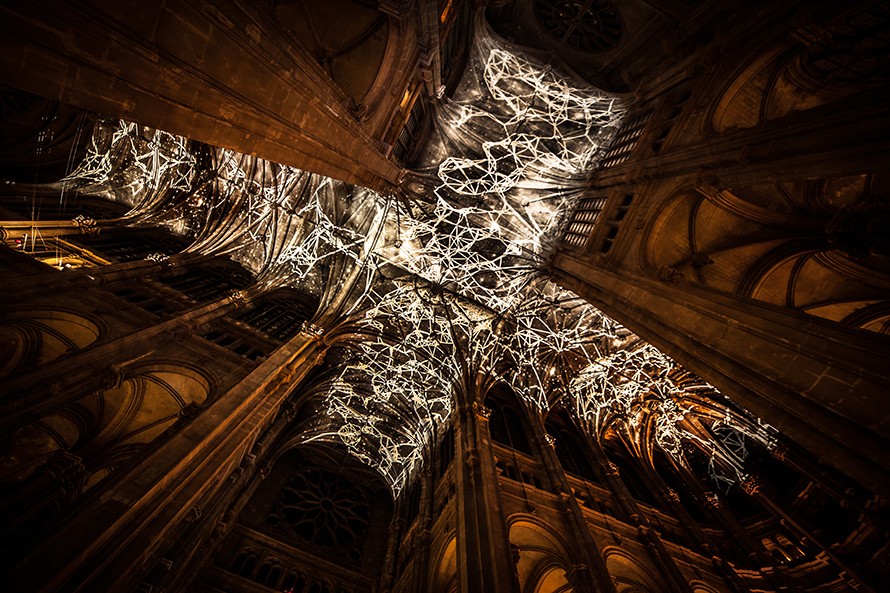
The particular project we started discussing took place this past Nuit Blanche in the Saint-Eustache Church in Paris. Transformed by digital artist Miguel Chevalier, the massive vaulted ceilings of the church were covered in incredible light shows that transformed the very nature of the shape of the building. The piece, entitled Voûtes Célestes, was accompanied by improvised organ music by Baptiste-Florian Marle-Ouvrard, the organist who usually performs at the regular church services.
While this is Chevalier's latest massive installation project, he's actually been working with digital media for a surprisingly long time. He was one of the first artists to begin employing computers in his work, going back as far as 1978 according to the biography on his personal website.
He has had an incredibly distinguished career, with hundreds of solo and group exhibitions under his belt, springboarded by a degree in Fine Arts and Archaeology from Université de Paris La Sorbonne.
As he puts it himself: "Since 1978, Chevalier has focused exclusively on computers as an artistic means of expression. He quickly secured a spot on the international scene as a pioneer of virtual and digital art. Miguel Chevalier continues to be a trailblazer, and has proven himself to be one of the most significant artists on the contemporary scene.
Miguel Chevalier's oeuvre is experimental and multidisciplinary. Taking references from the history of art and reformulating them using computer tools, his works investigate and explore recurrent themes such as nature and artifice, flows and networks, virtual cities and ornate designs. His images are a rich source of insights into ourselves and our relationship with the world."
Posted on December 07th 2016 on 05:20am
0 Comments
In the past, we wrote an Artist Spotlight about Chinese artist Cai Guo-Qiang, and a relatively strange installation piece he had created involving tortoises. In today's follow up we're going to look at a specific project that he created, and the Netflix documentary that goes along with it of the same name: Sky Ladder.
Aside from playing around with tortoises, which actually sounds like it might be kind of fun regardless of its relative artistic merit, Cai Guo-Qiang has had an extraordinary career in many other non-traditional media - namely in fireworks, coloured smoke and flame. Tortoises are great and all, but pyrotechnics must be a lot more fun, and Cai Guo-Qiang gained an incredible amount of fame for devising the pyrotechnic displays at the 2008 Beijing Olympic Games.
In 2014, he took his pyrotechnic effects to a new level using coloured smokes and incredibly carefully designed forms and was able to create a stunning range of effects, painting in the sky with smoke and flame. This eventually led to the development of his lifelong project, which has been chronicled in the documentary of the same name.
Produced by Kevin MacDonald and Wendi Deng Murdoch, Sky Ladder tells the story behind his life-long project that took a while to develop into a concept, and even longer into a feasible and performable project. There were many false starts before it was finally properly performed, but the final piece grows into a rather titanic scale that manages to look beautiful too - even though it's a touch more conceptual than the rest of his pyrotechnic work.
As Cai Guo-Qiang explains the project, it sounds like something the world could use more of:
Behind Sky Ladder lies a clear childhood dream of mine. Despite all life’s twists and turns, I have always been determined to realize it. My earlier proposals were either more abstract or ceremonial. Sky Ladder today is tender, and touches my heart deeply: it carries affection for my hometown, my relatives and my friends. In contrast to my other attempts, which set the ignition time at dusk, this time the ladder rose toward the morning sun, carrying hope. For me, this not only means a return but also the start of a new journey.
Posted on December 02nd 2016 on 05:00am
0 Comments
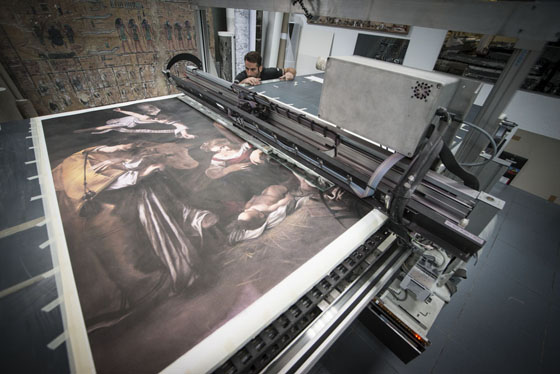
We recently wrote an edition of Artist Spotlight that featured the work of a young boy hoping to recreate the lost works of his cultural heritage as a means of fighting back against the devastation caused by the fanatics of the Islamic State. It was a touching story, and one that brings hope to the fight against the IS, but today we're going to look at a much more industrialized version of that struggle.
Welcome to Factum. This is a cutting-edge (literally, excuse the pun) factory that provides a number of artistic services, including working with big-name sculptors such as Anish Kapoor Maya Lin and Marc Quinn to realize their visions when the technical requirements are outside the artist's native capabilities.
That's not all they do, however- they also reconstruct pieces of cultural history that were destroyed by various terrorist groups or in other types of disaster.
They are incredibly talented, and incredibly perfectionist about it. The man in charge of Factum's replication services is Adam Lowe, and recently he went to see another firm's replica of a sculpted marble arch that was destroyed in Palmyra, Syria, also by the Islamic State terrorists.
Speaking to the New Yorker, he explained his distate: “If you look at the arch, there are these beautiful Corinthian columns on it, and on the finial it looks like there’s an artichoke on it. You can just tell that one of the people making it was, like, ‘That’s too hard right there,’ and simplified the shape! It’s appalling.”
As the author of the New Yorker piece opines, many people would first recall Walter Benjamin and the value (or lack thereof) in a replicated object - but can that really hold true when the original no longer exists? Perhaps there is a new 'aura' constructed around this object, even if it tempered by the knowledge that it isn't hundreds or thousands of years old.
Lowe, however unsurprisingly, disagrees again. "Factum is a place of atemporal creativity. People always say, ‘Isn’t it difficult working with contemporary artists and working with, say, Caravaggio?’ The answer is no. They’re exactly the same. The only difference is that Caravaggio is dead.”
Hopefully, they will be able to use incredibly sophisticated computer modelling technology to reconstruct objects from images, even when the original has long since been destroyed. Too much of the world's beautiful objects have been lost over the years, whether to willful destruction, simple negligence, or pure chance. The prospect of having them back with us is a wonderful one to envision.
Posted on November 30th 2016 on 02:31am
0 Comments
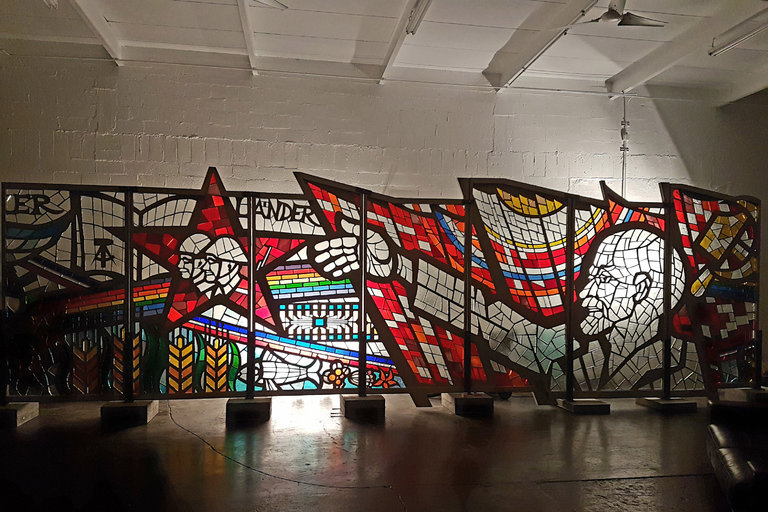
When one thinks of secret police, art is rarely the next subject to come to mind - unless it's in conjunction with the quality of censorship. Yet apparently, for the East German secret police post-World War II, it was quite a common thing to commission huge stained glass pieces commemorating particularly significant iconography - Lenin, naturally, as well as doves to symbolize the peace they believed they were protecting.
One particularly large piece commissioned in 1979 by Erich Mielke, the head of the Ministry of State Security, will be going on sale in conjunction with the Art Basel Miami Beach art fair that everyone is so particularly enamoured of. The price tag is a whopping $21.4 million dollars, although many appraisers scoff at such a ridiculously high price tag.
Sjeng Scheijen, an associate researcher at Leiden University who curated a recent exhibition at the Drents Museum “The quality of this piece is certainly not exceptional from an artistic point of view..If they will sell it for this price, you will see a storm of the same kind of art coming on the market, because many of these kinds of stained glass windows are very often in buildings from the ’70s and ’80s that aren’t used any more.”
The artist, Richard Otfried Wilhelm, is still alive today, but even he is not particularly convinced it's worth such a huge sum of money. There is a long and convoluted story about the provenance of the piece in an article by the New York Times
“It’s very colorful and beautiful, but what’s most important is that it shows that the artists in the G.D.R. were not free,” said Susanna Lillienthal, a conservator who helped track down the provenance of the piece. “They did what the dictators wanted. I grew up in the G.D.R. and I still have a hard time with it. But we need to save the dark parts of our history, too.”
An admirable sentiment, especially as it seems like the specter of facism is rising again in the modern world with the election of Donald Trump and the continued reign of Vladimir Putin. Remember: facism almost never makes worthwhile art, because, as Lillienthal said, you have to do what the dictators want - not what your artistic soul desires.
Posted on November 25th 2016 on 02:16am
0 Comments
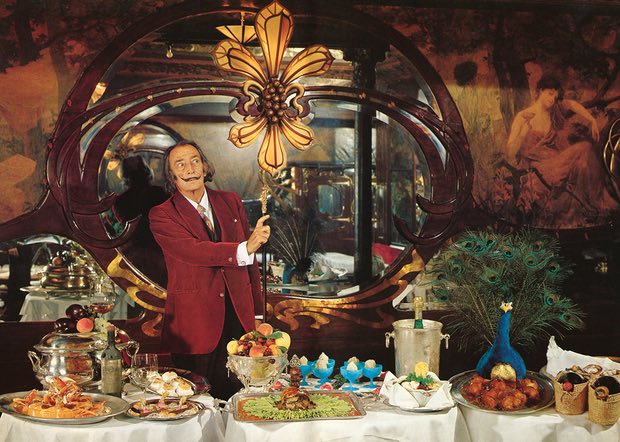
Salvador Dali is arguably one of the most famous artists in the world, and certainly one of the most famous artists of the Surrealist movement. Famous for his gorgeously complex, detailed and - obviously - surreal paintings, his ridiculous upturned moustache and the parties that he hosted/attended, it may come as a complete surprise that he once wrote a cookbook.
Yes, an actual cookbook, with recipes that you could make. If you were Dali. A Dali who was not particularly hungry but wanted to look at something gorgeously ridiculous. Original copies of the book are probably quite rare, but it is at last being republished in grand style by Taschen, famous for their exquisite and often unwieldy books for a scant 45 euros. Entitled Les Dîners de Gala, the book is available now, with this precautionary preface from Dali:
"We would like to state clearly that, beginning with the very first recipes, Les Diners de Gala, with its precepts and its illustrations, is uniquely devoted to the pleasures of Taste. Don’t look for dietetic formulas here.
We intend to ignore those charts and tables in which chemistry takes the place of gastronomy. If you are a disciple of one of those calorie-counters who turn the joys of eating into a form of punishment, close this book at once; it is too lively, too aggressive, and far too impertinent for you."
Apparently, Dali wanted to be chef when he was a child, before falling in love with the arts. This love of food is visible throughout a large number of his pieces - who, after all, could forget the lobster telephone?
Later in life, he became famous for his exquisite dinner parties, with some of the world's most famous chefs preparing the meals. Guests were all required to wear incredibly elaborate costumes in order to be let in the door, and wild animals like Dali's pet ocelot Babou would wander freely around the table.
"I only like to eat what has a clear and intelligible form. If I hate that detestable degrading vegetable called spinach it is because it is shapeless, like Liberty.
I attribute capital esthetic and moral values to food in general, and to spinach in particular. The opposite of shapeless spinach, is armor. I love eating suits of arms, in fact I love all shell fish… food that only a battle to peel makes it vulnerable to the conquest of our palate."
We hope you're confusing and delighting the hell out of everyone wherever you are now, Senor Dali.
Posted on November 23rd 2016 on 01:45am
0 Comments
It's probably fair to say that most artists generally find themselves on the more socially progressive side of the political spectrum. Facism, as an extreme of the right wing, is rarely the patron saint of the arts. Of course, extremes in any direction rarely appreciate the arts enough to cultivate them in a way that lets them thrive, but surely the election of Donald Trump has most artists stunned, outraged, or just downright depressed.
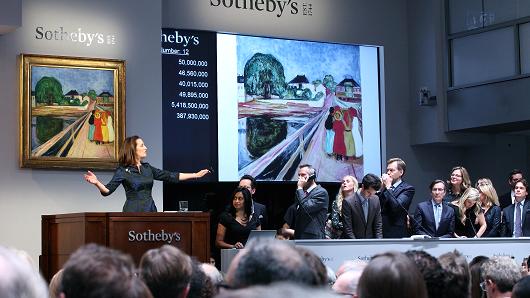
Except not every part of the art world is depressed about it, apparently - the auction houses are excited by the prospect of a Donald Trump presidency. It's moments like this that we reflect on why we stopped discussing the latest record-breaking sale from an auction house, and decided to focus more on living artists and their current works: in general, once art hits the auction house, it doesn't really have much to do with art anymore.
Instead, it's really nothing more than another part of an investment portfolio - which is surely at least partly why auction houses are the only part of the art world excited by the prospect of a Trump presidency. He's a billionaire, after all, and has enough capital to fill a whole bunch of gaudy gold frames.
"I think there's been a fairly good feeling among the art collectors this week," said Tad Smith, director of Sotheby's auction house in New York City, during an interview with CNBC. "There's just a lot of very wealthy people from all types of countries... and they have a lot of capital to deploy."
"Everywhere I go around the world, and really for almost 15 or 16 months, we've had a large group of buyers that have plenty of money to spend and they want to buy things. The trouble particularly in the last six to 12 months has been there hasn't been enough that they were offering."
"As long as we have a good, confident week, and I think we're going to do that, we're going to have more offered in the spring. That will free up the buyers. It's convincing those sellers that the buyers are there — that's the big opportunity."
Straight from the horse's mouth: it's not really about the art, it's about the extremely wealthy patrons who show up for Donald Trump's election that matter to them.
Posted on November 18th 2016 on 11:46pm
0 Comments
Continuing our theme of hope in the face of strife from last week with another dose of perspective, today's Artist Spotlight is going to look at the work of a young Assyrian sculptor named Nenous Thabit who has a powerful dose of hope for everyone affected by the destruction wrought by the Islamic State.
Most of the Islamic State's terrorist campaigns are launched at the local people, and one of their most potent weapons is the destruction of local temples and historic sites for being 'un-Islamic'. This breaks the link the local people have with their cultural heritage and, in theory, makes them more likely to embrace the twisted vision of Islam espoused by the terrorists.
His project will be a long one, but it's truly inspirational - he hopes to recreate many of the most famous works that have been destroyed by the Islamic State. At only 17 years of age, he has been practicing sculpting in his father's workshop, who is a professional sculptor.
Thabit was inspired to action by the destruction of the ancient Assyrian temple of Nimrud, which IS fighters bragged about destroying with sledge hammers and bulldozers for not being Islamic.
“They waged a war on art and culture, so I decided to fight them with art. Lamassu is my favourite statue, it is the strongest creature in the Assyrian heritage.
“In Iraq, there are people who are killed because they are sculptors, because they are artists. Continuing to sculpt is a message that we will not be intimidated by those devils.
“My dream is to become a prominent artist in Iraq to make my country proud and show the world that we in Iraq love life and cherish our heritage.”
So far, he has completed 18 new statues, including one of Lamassu, and is looking forwards to attending art school in the city of Dohuk in the coming year. Hopefully, he'll be able to maintain his optimism in the face of anger, and recreate many more of the lost treasures that so many artists, historians and curators have been racing to preserve.
Posted on November 16th 2016 on 09:04pm
0 Comments




 Faithful readers will no doubt remember the story of the treasure trove of artwork discovered recently in the attic of an elderly man in Munich and his second home in Salzburg. Cornelius Gurlitt had inherited the works from his art dealer father, a man who worked closely with the Nazis during World War Two during their destruction and confiscation of so-called 'degenerate art' (which essentially covered anything that wasn't classical Greco-Roman and Aryan, or that they just didn't like).
 It's not unusual for art thefts to make front page news, no matter where they happen in the world. But there is one long-running hunt for missing art that you've probably never heard of, but perhaps you can be forgiven since it started way back in 1986.
 So it looks like the world is going to have to come to terms with the presidency of Donald Trump, of all people. What once seemed like a joke (in fact, the TV show The Simpsons made just such a joke over a decade ago) has become the reality, and while that raises all kinds of postmodern questions about the nature of life imitating art, it's also a grim political reality.
 For thousands of years, churches of every denomination were the center points of art and culture in the West and beyond. They were protected places that escaped much of the harsher aspects of life, allowing them to preserve many more cultural treasures than other places could manage. Of course, this isn't usually the case today, where arts and culture flourish around the world in the absence of global wars, but on one special night the ages were crossed in a very unique way.
 We recently wrote an edition of Artist Spotlight that featured the work of a young boy hoping to recreate the lost works of his cultural heritage as a means of fighting back against the devastation caused by the fanatics of the Islamic State. It was a touching story, and one that brings hope to the fight against the IS, but today we're going to look at a much more industrialized version of that struggle.
 When one thinks of secret police, art is rarely the next subject to come to mind - unless it's in conjunction with the quality of censorship. Yet apparently, for the East German secret police post-World War II, it was quite a common thing to commission huge stained glass pieces commemorating particularly significant iconography - Lenin, naturally, as well as doves to symbolize the peace they believed they were protecting.
 Salvador Dali is arguably one of the most famous artists in the world, and certainly one of the most famous artists of the Surrealist movement. Famous for his gorgeously complex, detailed and - obviously - surreal paintings, his ridiculous upturned moustache and the parties that he hosted/attended, it may come as a complete surprise that he once wrote a cookbook.
 It's probably fair to say that most artists generally find themselves on the more socially progressive side of the political spectrum. Facism, as an extreme of the right wing, is rarely the patron saint of the arts. Of course, extremes in any direction rarely appreciate the arts enough to cultivate them in a way that lets them thrive, but surely the election of Donald Trump has most artists stunned, outraged, or just downright depressed.
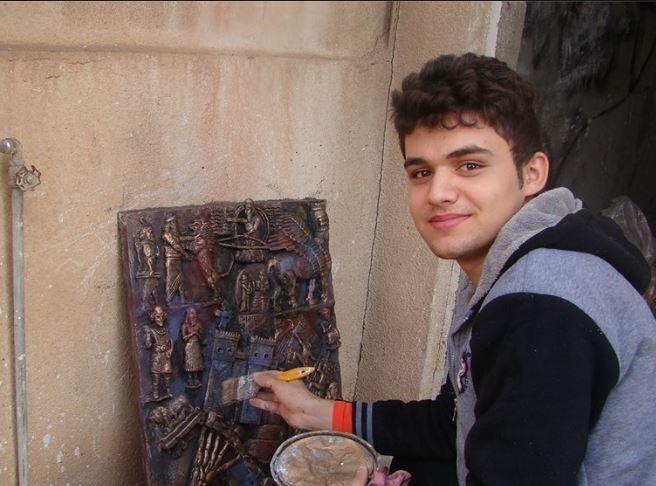 Continuing our theme of hope in the face of strife from last week with another dose of perspective, today's Artist Spotlight is going to look at the work of a young Assyrian sculptor named Nenous Thabit who has a powerful dose of hope for everyone affected by the destruction wrought by the Islamic State.